Compare commits
6 Commits
feature#ho
...
osrc
| Author | SHA1 | Date | |
|---|---|---|---|

|
d136b09d0f | ||
|
|
81896f9ba1 | ||
|
|
630c571f28 | ||
|
|
39d31ad196 | ||
|
|
70c31f1db7 | ||
|
|
589d178586 |
122
OSRC.md
Normal file
122
OSRC.md
Normal file
@@ -0,0 +1,122 @@
|
||||
|
||||
## HertzBeat 赫兹跳动在开源运行时OSRC部署流程
|
||||
|
||||
### HertzBeat介绍
|
||||
|
||||
> 易用友好的监控告警系统。
|
||||
|
||||

|
||||

|
||||

|
||||

|
||||

|
||||

|
||||

|
||||

|
||||
|
||||
**官网: [hertzbeat.com](https://hertzbeat.com) | [tancloud.cn](https://tancloud.cn)**
|
||||
|
||||
> [HertzBeat赫兹跳动](https://github.com/dromara/hertzbeat) 是由[Dromara](https://dromara.org)孵化,[TanCloud](https://tancloud.cn)开源的一个支持网站,API,PING,端口,数据库,操作系统等监控类型,拥有易用友好的可视化操作界面的开源监控告警项目。
|
||||
> 提供了对应的 **[SAAS版本监控云](https://console.tancloud.cn)**,中小团队和个人无需再为了监控自己的网站资源,而去部署一套繁琐的监控系统,**[登录即可免费开始](https://console.tancloud.cn)**。
|
||||
> HertzBeat 支持[自定义监控](https://hertzbeat.com/docs/advanced/extend-point) ,只用通过配置YML文件我们就可以自定义需要的监控类型和指标,来满足常见的个性化需求。
|
||||
> HertzBeat 模块化,`manager, collector, scheduler, warehouse, alerter` 各个模块解耦合,方便理解与定制开发。
|
||||
> HertzBeat 支持更自由化的告警配置(计算表达式),支持告警通知,告警模版,邮件钉钉微信飞书等及时通知送达
|
||||
> 欢迎登录 HertzBeat 的 [云环境TanCloud](https://console.tancloud.cn) 试用发现更多。
|
||||
> 正在快速迭代中,欢迎参与加入一起共建项目开源生态。
|
||||
|
||||
> `HertzBeat`的多类型支持,易扩展,低耦合,希望能帮助开发者和中小团队快速搭建自有监控系统。
|
||||
|
||||
----
|
||||
|
||||
### 在开源运行时社区的部署过程
|
||||
|
||||
1. 注册开源运行时社区账户 osrc.com
|
||||
|
||||
进入网站 osrc.com 登录注册,购买需要的云服务器或Serverless
|
||||
|
||||
2. 本地安装osrc开发者工具
|
||||
```
|
||||
# clone maplecloudy-osrc-tools to local
|
||||
git clone https://github.com/maplecloudy/maplecloudy-osrt-tools.git
|
||||
# 下载后通过maven在本地安装
|
||||
mvn clean install
|
||||
# 进入osrc-cli目录安装cli
|
||||
npm install
|
||||
npm link
|
||||
# 支持 osrc 看cli是否安装成功
|
||||
osrc
|
||||
```
|
||||
|
||||
4. 部署依赖服务-MYSQL和TDengine
|
||||
|
||||
> HertzBeat最少依赖于 关系型数据库[MYSQL5+](https://www.mysql.com/) 和 时序性数据库[TDengine2+](https://www.taosdata.com/getting-started)
|
||||
> 我们需要将依赖服务部署到公有云上,即数据存储自己保存,计算运行在开源运行时社区,保证数据安全性。
|
||||
|
||||
###### 部署MYSQL
|
||||
- docker安装MYSQl
|
||||
`docker run -d --name mysql -p 3306:3306 -e MYSQL_ROOT_PASSWORD=123456 mysql:5.7`
|
||||
- 创建名称为hertzbeat的数据库
|
||||
- 执行位于项目仓库/script/sql/目录下的数据库脚本 [schema.sql](https://gitee.com/dromara/hertzbeat/raw/master/script/sql/schema.sql)
|
||||
|
||||
详细步骤参考 [依赖服务MYSQL安装初始化](https://hertzbeat.com/docs/start/mysql-init)
|
||||
|
||||
###### 部署TDengine
|
||||
- docker安装TDengine
|
||||
`docker run -d -p 6030-6049:6030-6049 -p 6030-6049:6030-6049/udp --name tdengine tdengine/tdengine:2.4.0.12`
|
||||
- 创建名称为hertzbeat的数据库
|
||||
|
||||
详细步骤参考 [依赖服务TDengine安装初始化](https://hertzbeat.com/docs/start/tdengine-init)
|
||||
|
||||
2. 拉取hertzbeat项目代码,git切换到`osrc`分支
|
||||
|
||||
[github仓库](https://github.com/dromara/hertzbeat) [gitee仓库](https://github.com/dromara/hertzbeat)
|
||||
```
|
||||
git clone https://github.com/dromara/hertzbeat.git
|
||||
git checkout osrc
|
||||
```
|
||||
3. 配置MYSQL-TDengine服务连接
|
||||
|
||||
修改位于 `hertzbeat/manager/resources/application.yml` 的配置文件
|
||||
需要替换里面的MYSQL服务和TDengine服务参数,IP端口账户密码
|
||||
具体替换参数如下:
|
||||
```
|
||||
spring.datasource.url
|
||||
spring.datasource.username
|
||||
spring.datasource.password
|
||||
|
||||
warehouse.store.td-engine.url
|
||||
warehouse.store.td-engine.username
|
||||
warehouse.store.td-engine.password
|
||||
|
||||
```
|
||||
|
||||
4. 注册OSRC账户,上传部署hertzbeat后端服务
|
||||
|
||||
进入网站 https://osrc.com , 注册用户
|
||||
在本地hertzbeat项目下执行 `mvn clean intall` 部署上传到osrc
|
||||
注意交互控制台会提示输入账户密码登录。
|
||||
|
||||
5. 启动hertzbeat后端服务
|
||||
|
||||
进入网站 https://osrc.com, 个人中心 -> 我的应用 -> 启动服务
|
||||
|
||||
<img alt="tan-cloud" src="https://tancloud.gd2.qingstor.com/tmp/%E6%88%AA%E5%B1%8F2022-04-19%2017.59.20.png" width="1000"/>
|
||||
|
||||
6. 构建前端项目
|
||||
|
||||
在本地hertzbeat项目下 `web-app` 目录下执行 `yarn build`
|
||||
|
||||
7. 上传部署hertzbeat前端服务
|
||||
|
||||
在本地hertzbeat项目下 `web-app` 目录下执行 `osrc deploy`
|
||||
|
||||
8. 配置前端代理
|
||||
|
||||
进入网站 https://osrc.com, 个人中心 -> 我的pages -> 代理配置
|
||||
配置前端调用接口流量走刚刚部署的后台服务
|
||||
<img alt="tan-cloud" src="https://tancloud.gd2.qingstor.com/tmp/cc.png" width="1000"/>
|
||||
|
||||
9. 部署完成,发布应用
|
||||
部署OK,点击page页面连接即可使用服务!
|
||||
|
||||
|
||||
@@ -21,6 +21,8 @@
|
||||
|
||||
**官网: [hertzbeat.com](https://hertzbeat.com) | [tancloud.cn](https://tancloud.cn)**
|
||||
|
||||
在开源运行时社区[OSCR.COM](https://osrc.com)快速运行HertzBeat - [部署流程](https://osrc.com/user/articles/wiki_776513931985080320)
|
||||
|
||||
## 🎡 <font color="green">介绍</font>
|
||||
|
||||
> [HertzBeat赫兹跳动](https://github.com/dromara/hertzbeat) 是由[Dromara](https://dromara.org)孵化,[TanCloud](https://tancloud.cn)开源的一个支持网站,API,PING,端口,数据库,操作系统等监控类型,拥有易用友好的可视化操作界面的开源监控告警项目。
|
||||
@@ -62,6 +64,8 @@
|
||||
- 如果您不想部署而是直接使用,我们提供SAAS监控云-[TanCloud探云](https://console.tancloud.cn),即刻 **[登录注册](https://console.tancloud.cn)** 免费使用。
|
||||
- 如果您是想将HertzBeat部署到内网环境搭建监控系统,请参考下面的 [部署文档](https://hertzbeat.com/docs/start/quickstart) 进行操作。
|
||||
|
||||
安装部署视频教程: [HertzBeat安装部署-BiliBili](https://www.bilibili.com/video/BV1GY41177YL)
|
||||
|
||||
### 🐵 依赖服务部署
|
||||
|
||||
> HertzBeat最少依赖于 关系型数据库[MYSQL5+](https://www.mysql.com/) 和 时序性数据库[TDengine2+](https://www.taosdata.com/getting-started)
|
||||
|
||||
@@ -6,6 +6,8 @@ sidebar_label: Docker方式部署
|
||||
|
||||
> 推荐使用docker部署HertzBeat
|
||||
|
||||
安装部署视频教程: [HertzBeat安装部署-BiliBili](https://www.bilibili.com/video/BV1GY41177YL)
|
||||
|
||||
1. 下载安装Docker环境
|
||||
Docker 工具自身的下载请参考 [Docker官网文档](https://docs.docker.com/get-docker/)。
|
||||
安装完毕后终端查看Docker版本是否正常输出。
|
||||
@@ -47,71 +49,101 @@ sidebar_label: Docker方式部署
|
||||
|
||||
```yaml
|
||||
|
||||
resourceRole:
|
||||
- /account/auth/refresh===post===[role1,role2,role3,role4]
|
||||
resourceRole:
|
||||
- /account/auth/refresh===post===[admin,user,guest]
|
||||
- /apps/**===get===[admin,user,guest]
|
||||
- /monitor/**===get===[admin,user,guest]
|
||||
- /monitor/**===post===[admin,user]
|
||||
- /monitor/**===put===[admin,user]
|
||||
- /monitor/**===delete==[admin]
|
||||
- /monitors/**===get===[admin,user,guest]
|
||||
- /monitors/**===post===[admin,user]
|
||||
- /monitors/**===put===[admin,user]
|
||||
- /monitors/**===delete===[admin]
|
||||
- /alert/**===get===[admin,user,guest]
|
||||
- /alert/**===post===[admin,user]
|
||||
- /alert/**===put===[admin,user]
|
||||
- /alert/**===delete===[admin]
|
||||
- /alerts/**===get===[admin,user,guest]
|
||||
- /alerts/**===post===[admin,user]
|
||||
- /alerts/**===put===[admin,user]
|
||||
- /alerts/**===delete===[admin]
|
||||
- /notice/**===get===[admin,user,guest]
|
||||
- /notice/**===post===[admin,user]
|
||||
- /notice/**===put===[admin,user]
|
||||
- /notice/**===delete===[admin]
|
||||
- /summary/**===get===[admin,user,guest]
|
||||
- /summary/**===post===[admin,user]
|
||||
- /summary/**===put===[admin,user]
|
||||
- /summary/**===delete===[admin]
|
||||
|
||||
excludedResource:
|
||||
- /account/auth/**===*
|
||||
- /===get
|
||||
- /i18n/**===get
|
||||
- /apps/hierarchy===get
|
||||
- /console/**===get
|
||||
- /**/*.html===get
|
||||
- /**/*.js===get
|
||||
- /**/*.css===get
|
||||
- /**/*.ico===get
|
||||
- /**/*.ttf===get
|
||||
- /**/*.png===get
|
||||
- /**/*.gif===get
|
||||
excludedResource:
|
||||
- /account/auth/**===*
|
||||
- /===get
|
||||
- /i18n/**===get
|
||||
- /apps/hierarchy===get
|
||||
# web ui 静态资源
|
||||
- /console/**===get
|
||||
- /**/*.html===get
|
||||
- /**/*.js===get
|
||||
- /**/*.css===get
|
||||
- /**/*.ico===get
|
||||
- /**/*.ttf===get
|
||||
- /**/*.png===get
|
||||
- /**/*.gif===get
|
||||
- /**/*.png===*
|
||||
- /swagger-resources/**===get
|
||||
- /v2/api-docs===get
|
||||
- /v3/api-docs===get
|
||||
# swagger ui 资源
|
||||
- /swagger-resources/**===get
|
||||
- /v2/api-docs===get
|
||||
- /v3/api-docs===get
|
||||
|
||||
# 用户账户信息
|
||||
# 下面有 admin tom lili 三个账户
|
||||
# eg: admin 拥有[role1,role2]角色,密码为admin
|
||||
# eg: tom 拥有[role1,role2,role3],密码为tom@123
|
||||
# eg: lili 拥有[role1,role2],明文密码为lili, 加盐密码为1A676730B0C7F54654B0E09184448289
|
||||
account:
|
||||
- appId: admin
|
||||
account:
|
||||
- appId: admin
|
||||
credential: admin
|
||||
role: [role1,role2]
|
||||
- appId: tom
|
||||
role: [admin,user]
|
||||
- appId: tom
|
||||
credential: tom@123
|
||||
role: [role1,role2,role3]
|
||||
- appId: lili
|
||||
role: [user]
|
||||
- appId: guest
|
||||
credential: guest
|
||||
role: [guest]
|
||||
- appId: lili
|
||||
# 注意 Digest认证不支持加盐加密的密码账户
|
||||
# 加盐加密的密码,通过 MD5(password+salt)计算
|
||||
# 此账户的原始密码为 lili
|
||||
credential: 1A676730B0C7F54654B0E09184448289
|
||||
salt: 123
|
||||
role: [role1,role2]
|
||||
role: [guest]
|
||||
|
||||
```
|
||||
|
||||
修改sureness.yml的如下**部分参数**:**[注意⚠️sureness配置的其它默认参数需保留]**
|
||||
|
||||
```yaml
|
||||
|
||||
# 用户账户信息
|
||||
# 下面有 admin tom lili 三个账户
|
||||
# eg: admin 拥有[role1,role2]角色,密码为admin
|
||||
# eg: tom 拥有[role1,role2,role3],密码为tom@123
|
||||
# eg: lili 拥有[role1,role2],明文密码为lili, 加盐密码为1A676730B0C7F54654B0E09184448289
|
||||
account:
|
||||
- appId: admin
|
||||
# 用户账户信息
|
||||
# 下面有 admin tom lili 三个账户
|
||||
# eg: admin 拥有[admin,user]角色,密码为admin
|
||||
# eg: tom 拥有[user],密码为tom@123
|
||||
# eg: lili 拥有[guest],明文密码为lili, 加盐密码为1A676730B0C7F54654B0E09184448289
|
||||
account:
|
||||
- appId: admin
|
||||
credential: admin
|
||||
role: [role1,role2]
|
||||
- appId: tom
|
||||
role: [admin,user]
|
||||
- appId: tom
|
||||
credential: tom@123
|
||||
role: [role1,role2,role3]
|
||||
- appId: lili
|
||||
role: [user]
|
||||
- appId: guest
|
||||
credential: guest
|
||||
role: [guest]
|
||||
- appId: lili
|
||||
# 注意 Digest认证不支持加盐加密的密码账户
|
||||
# 加盐加密的密码,通过 MD5(password+salt)计算
|
||||
# 此账户的原始密码为 lili
|
||||
credential: 1A676730B0C7F54654B0E09184448289
|
||||
salt: 123
|
||||
role: [role1,role2]
|
||||
role: [guest]
|
||||
|
||||
```
|
||||
|
||||
6. 启动HertzBeat Docker容器
|
||||
|
||||
@@ -5,6 +5,8 @@ sidebar_label: MYSQL安装初始化
|
||||
---
|
||||
MYSQL是一款值得信赖的关系型数据库,HertzBeat使用其存储监控信息,告警信息,配置信息等结构化关系数据。
|
||||
|
||||
安装部署视频教程: [HertzBeat安装部署-BiliBili](https://www.bilibili.com/video/BV1GY41177YL)
|
||||
|
||||
> 如果您已有MYSQL环境,可直接跳到SQL脚本执行那一步。
|
||||
|
||||
### 通过Docker方式安装MYSQL
|
||||
|
||||
@@ -3,7 +3,9 @@ id: package-deploy
|
||||
title: 通过安装包安装HertzBeat
|
||||
sidebar_label: 安装包方式部署
|
||||
---
|
||||
> HertzBeat支持在Linux Windows Mac系统安装运行,CPU支持X64/ARM64。由于安装包自身不包含JAVA运行环境,需您提前准备JAVA运行环境。
|
||||
> HertzBeat支持在Linux Windows Mac系统安装运行,CPU支持X86/ARM64。由于安装包自身不包含JAVA运行环境,需您提前准备JAVA运行环境。
|
||||
|
||||
安装部署视频教程: [HertzBeat安装部署-BiliBili](https://www.bilibili.com/video/BV1GY41177YL)
|
||||
|
||||
1. 安装JAVA运行环境-可参考[官方网站](http://www.oracle.com/technetwork/java/javase/downloads/index.html)
|
||||
要求:JDK8+(已验证JDK8)
|
||||
@@ -49,25 +51,30 @@ sidebar_label: 安装包方式部署
|
||||
修改sureness.yml的如下**部分参数**:**[注意⚠️sureness配置的其它默认参数需保留]**
|
||||
|
||||
```yaml
|
||||
# 用户账户信息
|
||||
# 下面有 admin tom lili 三个账户
|
||||
# eg: admin 拥有[role1,role2]角色,密码为admin
|
||||
# eg: tom 拥有[role1,role2,role3],密码为tom@123
|
||||
# eg: lili 拥有[role1,role2],明文密码为lili, 加盐密码为1A676730B0C7F54654B0E09184448289
|
||||
account:
|
||||
- appId: admin
|
||||
|
||||
# 用户账户信息
|
||||
# 下面有 admin tom lili 三个账户
|
||||
# eg: admin 拥有[admin,user]角色,密码为admin
|
||||
# eg: tom 拥有[user],密码为tom@123
|
||||
# eg: lili 拥有[guest],明文密码为lili, 加盐密码为1A676730B0C7F54654B0E09184448289
|
||||
account:
|
||||
- appId: admin
|
||||
credential: admin
|
||||
role: [role1,role2]
|
||||
- appId: tom
|
||||
role: [admin,user]
|
||||
- appId: tom
|
||||
credential: tom@123
|
||||
role: [role1,role2,role3]
|
||||
- appId: lili
|
||||
role: [user]
|
||||
- appId: guest
|
||||
credential: guest
|
||||
role: [guest]
|
||||
- appId: lili
|
||||
# 注意 Digest认证不支持加盐加密的密码账户
|
||||
# 加盐加密的密码,通过 MD5(password+salt)计算
|
||||
# 此账户的原始密码为 lili
|
||||
credential: 1A676730B0C7F54654B0E09184448289
|
||||
salt: 123
|
||||
role: [role1,role2]
|
||||
role: [guest]
|
||||
|
||||
```
|
||||
|
||||
5. 部署启动
|
||||
|
||||
@@ -9,6 +9,8 @@ sidebar_label: 快速开始
|
||||
- 如果您不想部署而是直接使用,我们提供SAAS监控云-[TanCloud探云](https://console.tancloud.cn),即刻[登录注册](https://console.tancloud.cn)免费使用。
|
||||
- 如果您是想将HertzBeat部署到内网环境搭建监控系统,请参考下面的部署文档进行操作。
|
||||
|
||||
安装部署视频教程: [HertzBeat安装部署-BiliBili](https://www.bilibili.com/video/BV1GY41177YL)
|
||||
|
||||
### 🐵 依赖服务部署
|
||||
|
||||
> HertzBeat最少依赖于 关系型数据库[MYSQL5+](https://www.mysql.com/) 和 时序性数据库[TDengine2+](https://www.taosdata.com/getting-started)
|
||||
|
||||
@@ -5,8 +5,11 @@ sidebar_label: TDengine安装初始化
|
||||
---
|
||||
TDengine是一款国产的开源物联网时序型数据库,我们使用其替换了InfluxDb,来存储采集到的监控指标数据。
|
||||
|
||||
安装部署视频教程: [HertzBeat安装部署-BiliBili](https://www.bilibili.com/video/BV1GY41177YL)
|
||||
|
||||
> 如果您已有TDengine环境,可直接跳到创建数据库实例那一步。
|
||||
|
||||
|
||||
### 通过Docker方式安装TDengine
|
||||
> 可参考官方网站[安装教程](https://www.taosdata.com/docs/cn/v2.0/getting-started/docker)
|
||||
1. 下载安装Docker环境
|
||||
|
||||
14
home/i18n/en/docusaurus-plugin-content-blog/options.json
Normal file
14
home/i18n/en/docusaurus-plugin-content-blog/options.json
Normal file
@@ -0,0 +1,14 @@
|
||||
{
|
||||
"title": {
|
||||
"message": "Blog",
|
||||
"description": "The title for the blog used in SEO"
|
||||
},
|
||||
"description": {
|
||||
"message": "Blog",
|
||||
"description": "The description for the blog used in SEO"
|
||||
},
|
||||
"sidebar.title": {
|
||||
"message": "Recent posts",
|
||||
"description": "The label for the left sidebar"
|
||||
}
|
||||
}
|
||||
@@ -1,38 +1,19 @@
|
||||
---
|
||||
id: contact
|
||||
title: 交流联系
|
||||
sidebar_label: 交流联系
|
||||
title: Join discussion
|
||||
sidebar_label: Discussion
|
||||
---
|
||||
> 如果您在使用过程有任何需要帮助或者想交流建议,可以通过 微信群、QQ群 社区网站 ISSUE 讨论交流。
|
||||
|
||||
## BUG问题报告,功能建议相关建议通过仓库ISSUE
|
||||
> If you need any help or want to exchange suggestions during the use process, you can discuss and exchange through ISSUE or Github Discussion.
|
||||
|
||||
[GITEE仓库ISSUES](https://gitee.com/dromara/hertzbeat/issues)
|
||||
[GITHUB仓库ISSUES](https://github.com/dromara/hertzbeat/issues)
|
||||
[GITHUB ISSUES](https://github.com/dromara/hertzbeat/issues)
|
||||
[GITEE ISSUES](https://gitee.com/dromara/hertzbeat/issues)
|
||||
|
||||
## 微信交流群
|
||||
##### Github Discussion
|
||||
|
||||
加微信号 tan-cloud 或 扫描下面账号二维码拉您进微信群。
|
||||
<img alt="tan-cloud" src="https://cdn.jsdelivr.net/gh/dromara/hertzbeat@gh-pages/img/docs/help/tan-cloud-wechat.jpg" width="400"/>
|
||||
Welcome to Discuss in [Github Discussion](https://github.com/dromara/hertzbeat/discussions)
|
||||
|
||||
## QQ交流群
|
||||
|
||||
加QQ群号 718618151 或 扫描下面的群二维码进群, 验证信息: tancloud
|
||||
|
||||
<img alt="tan-cloud" src="https://cdn.jsdelivr.net/gh/dromara/hertzbeat@gh-pages/img/docs/help/qq-qr.jpg" width="400"/>
|
||||
|
||||
## 交流网站
|
||||
|
||||
[Dromara社区网站](https://dromara.org/)
|
||||
|
||||
[HertzBeat用户网站](https://support.qq.com/products/379369)
|
||||
|
||||
## 微信公众号
|
||||
##### Public WeChat
|
||||
|
||||
<img alt="tan-cloud" src="https://cdn.jsdelivr.net/gh/dromara/hertzbeat/home/static/img/wechat.png" width="400"/>
|
||||
|
||||
|
||||
## 其它联系
|
||||
其它工作联系,联系电话:18781603458 微信: tomsun28
|
||||
|
||||
|
||||
|
||||
@@ -4,10 +4,10 @@ title: 设计文档
|
||||
sidebar_label: 设计文档
|
||||
---
|
||||
|
||||
### HertzBeat架构
|
||||
### HertzBeat Architecture
|
||||
|
||||

|
||||
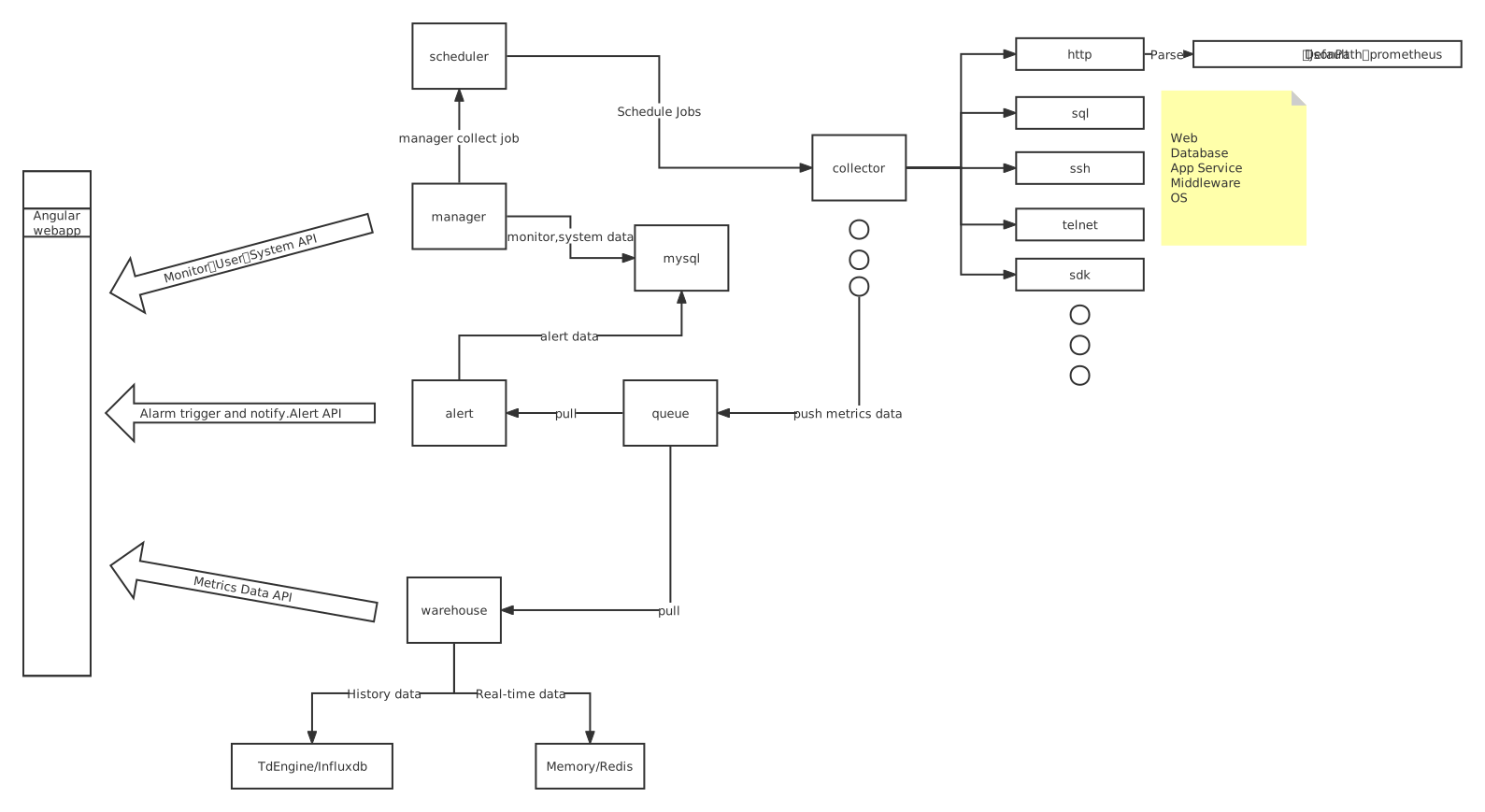
|
||||
|
||||
### TanCloud架构
|
||||
### TanCloud Architecture
|
||||
|
||||
TanCloud是基于HertzBeat的公网SAAS集群版本,采用多集群,多租户的架构模式。
|
||||
TanCloud is a SAAS cluster version based on HertzBeat, which adopts a multi-cluster and multi-tenant architecture model.
|
||||
|
||||
@@ -12,8 +12,8 @@ sidebar_label: 赞助
|
||||

|
||||
|
||||
|
||||
感谢[吉实信息(构建全新的微波+光交易网络)](https://www.flarespeed.com) 赞助服务器采集节点
|
||||
感谢[天上云计算(全新智慧上云)](https://www.tsyvps.com/aff/BZBEGYLX) 赞助服务器采集节点
|
||||
Thanks [吉实信息(构建全新的微波+光交易网络)](https://www.flarespeed.com) sponsored server node.
|
||||
Thanks [天上云计算(全新智慧上云)](https://www.tsyvps.com/aff/BZBEGYLX) sponsored server node.
|
||||
|
||||
|
||||
|
||||
|
||||
@@ -1,60 +1,63 @@
|
||||
---
|
||||
id: quickstart
|
||||
title: 快速开始
|
||||
sidebar_label: 快速开始
|
||||
title: Quick Start
|
||||
sidebar_label: Quick Start
|
||||
---
|
||||
|
||||
### 🐕 开始使用
|
||||
### 🐕 Quick Start
|
||||
|
||||
- 如果您不想部署而是直接使用,我们提供SAAS监控云-[TanCloud探云](https://console.tancloud.cn),即刻[登录注册](https://console.tancloud.cn)免费使用。
|
||||
- 如果您是想将HertzBeat部署到内网环境搭建监控系统,请参考下面的部署文档进行操作。
|
||||
- If you don’t want to deploy but use it directly, we provide [SAAS Monitoring Cloud-TanCloud](https://console.tancloud.cn), **[Log In And Register For Free](https://console.tancloud.cn) **.
|
||||
- If you want to deploy HertzBeat local, please refer to the following [Deployment Documentation](https://hertzbeat.com/docs/start/quickstart) for operation.
|
||||
|
||||
### 🐵 依赖服务部署
|
||||
### 🐵 Dependency Service Deployment
|
||||
|
||||
> HertzBeat最少依赖于 关系型数据库[MYSQL5+](https://www.mysql.com/) 和 时序性数据库[TDengine2+](https://www.taosdata.com/getting-started)
|
||||
> HertzBeat depends at least on relational database [MYSQL5+](https://www.mysql.com/) and time series database [TDengine2+](https://www.taosdata.com/getting-started)
|
||||
|
||||
##### 安装MYSQL
|
||||
1. docker安装MYSQl
|
||||
`docker run -d --name mysql -p 3306:3306 -e MYSQL_ROOT_PASSWORD=123456 mysql:5.7`
|
||||
2. 创建名称为hertzbeat的数据库
|
||||
3. 执行位于项目仓库/script/sql/目录下的数据库脚本 [schema.sql](https://gitee.com/dromara/hertzbeat/raw/master/script/sql/schema.sql)
|
||||
|
||||
详细步骤参考 [依赖服务MYSQL安装初始化](mysql-init.md)
|
||||
##### Install MYSQL
|
||||
1. Install mysql with docker
|
||||
`docker run -d --name mysql -p 3306:3306 -e MYSQL_ROOT_PASSWORD=123456 mysql:5.7`
|
||||
2. Create database names `hertzbeat`
|
||||
3. Run the database sql script [schema.sql](https://gitee.com/dromara/hertzbeat/raw/master/script/sql/schema.sql) located in the project repository `/script/sql/` directory.
|
||||
|
||||
##### 安装TDengine
|
||||
1. docker安装TDengine
|
||||
`docker run -d -p 6030-6049:6030-6049 -p 6030-6049:6030-6049/udp --name tdengine tdengine/tdengine:2.4.0.12`
|
||||
2. 创建名称为hertzbeat的数据库
|
||||
For detailed steps, refer to [MYSQL Installation And Initialization](https://hertzbeat.com/docs/start/mysql-init)
|
||||
|
||||
详细步骤参考 [依赖服务TDengine安装初始化](tdengine-init.md)
|
||||
##### Install TDengine
|
||||
1. Install TDengine with docker
|
||||
`docker run -d -p 6030-6049:6030-6049 -p 6030-6049:6030-6049/udp --name tdengine tdengine/tdengine:2.4.0.12`
|
||||
2. Create database names `hertzbeat`
|
||||
|
||||
### 🍞 HertzBeat安装
|
||||
> HertzBeat支持通过源码安装启动,Docker容器运行和安装包方式安装部署。
|
||||
For detailed steps, refer to [TDengine Installation And Initialization](https://hertzbeat.com/docs/start/tdengine-init).
|
||||
|
||||
#### 方式一:Docker方式快速安装
|
||||
### 🍞 Install HertzBeat
|
||||
|
||||
> HertzBeat supports installation through source code, docker or package.
|
||||
|
||||
##### 1:Install quickly via docker
|
||||
`docker run -d -p 1157:1157 -v /opt/application.yml:/opt/hertzbeat/config/application.yml --name hertzbeat tancloud/hertzbeat:[版本tag]`
|
||||
|
||||
详细步骤参考 [通过Docker方式安装HertzBeat](docker-deploy.md)
|
||||
Detailed steps refer to [Install HertzBeat via Docker](https://hertzbeat.com/docs/start/docker-deploy)
|
||||
|
||||
#### 方式二:通过安装包安装
|
||||
1. 下载您系统环境对应的安装包 [GITEE Release](https://gitee.com/dromara/hertzbeat/releases) [GITHUB Release](https://github.com/dromara/hertzbeat/releases)
|
||||
2. 配置HertzBeat的配置文件 hertzbeat/config/application.yml
|
||||
3. 部署启动 `$ ./startup.sh `
|
||||
##### 2:Install via package
|
||||
1. Download the installation package [GITEE Release](https://gitee.com/dromara/hertzbeat/releases) [GITHUB Release](https://github.com/dromara/hertzbeat/releases)
|
||||
2. Configure the HertzBeat configuration yml file `hertzbeat/config/application.yml`
|
||||
3. Run shell `$ ./startup.sh `
|
||||
4. Access `localhost:1157` to start, default account: `admin/admin`
|
||||
|
||||
详细步骤参考 [通过安装包安装HertzBeat](package-deploy.md)
|
||||
Detailed steps refer to [Install HertzBeat via package](https://hertzbeat.com/docs/start/package-deploy)
|
||||
|
||||
#### 方式三:本地代码启动
|
||||
1. 此为前后端分离项目,本地代码调试需要分别启动后端工程manager和前端工程web-app
|
||||
2. 后端:需要`maven3+`和`java8+`环境,修改YML配置信息并启动manager服务
|
||||
3. 前端:需要`nodejs npm angular-cli`环境,待本地后端启动后,在web-app目录下启动 `ng serve --open`
|
||||
4. 浏览器访问 localhost:4200 即可开始,默认账户密码 admin/admin
|
||||
##### 3:Start via source code
|
||||
1. Local source code debugging needs to start the back-end project manager and the front-end project web-app.
|
||||
2. Backend:need `maven3+`, `java8+`, start the manager service.
|
||||
3. Web:need `nodejs npm angular-cli` environment, Run `ng serve --open` in `web-app` directory after backend startup.
|
||||
4. Access `localhost:4200` to start, default account: `admin/admin`
|
||||
|
||||
详细步骤参考 [参与贡献之本地代码启动](../others/contributing)
|
||||
Detailed steps refer to [CONTRIBUTING](CONTRIBUTING.md)
|
||||
|
||||
#### 方式四:Docker-Compose统一安装hertzbeat及其依赖服务
|
||||
##### 4:Install All(mysql+tdengine+hertzbeat) via Docker-compose
|
||||
|
||||
通过 [docker-compose部署脚本](https://gitee.com/dromara/hertzbeat/tree/master/script/docker-compose) 一次性把mysql数据库,tdengine数据库和hertzbeat安装部署。
|
||||
Install and deploy the mysql database, tdengine database and hertzbeat at one time through [docker-compose deployment script](script/docker-compose).
|
||||
|
||||
详细步骤参考 [docker-compose安装](https://gitee.com/dromara/hertzbeat/tree/master/script/docker-compose/README.md)
|
||||
Detailed steps refer to [docker-compose install](script/docker-compose/README.md)
|
||||
|
||||
**HAVE FUN**
|
||||
|
||||
@@ -107,64 +107,17 @@
|
||||
</dependencies>
|
||||
|
||||
<build>
|
||||
<finalName>hertzbeat</finalName>
|
||||
<resources>
|
||||
<resource>
|
||||
<directory>src/main/resources</directory>
|
||||
<filtering>true</filtering>
|
||||
<includes>
|
||||
<include>application.yml</include>
|
||||
<include>sureness.yml</include>
|
||||
<include>banner.txt</include>
|
||||
<include>define/**</include>
|
||||
<include>**/*.html</include>
|
||||
</includes>
|
||||
</resource>
|
||||
</resources>
|
||||
<plugins>
|
||||
<plugin>
|
||||
<groupId>org.apache.maven.plugins</groupId>
|
||||
<artifactId>maven-jar-plugin</artifactId>
|
||||
<version>3.2.0</version>
|
||||
<configuration>
|
||||
<classesDirectory>target/classes/</classesDirectory>
|
||||
<archive>
|
||||
<!--生成的jar包不包含maven描述相关文件-->
|
||||
<addMavenDescriptor>false</addMavenDescriptor>
|
||||
<manifest>
|
||||
<!--项目启动类-->
|
||||
<mainClass>com.usthe.manager.Manager</mainClass>
|
||||
<useUniqueVersions>false</useUniqueVersions>
|
||||
<!--第三方JAR加入类构建的路径maven-dependency-plugin-->
|
||||
<addClasspath>true</addClasspath>
|
||||
<!--外部依赖jar包的位置-->
|
||||
<classpathPrefix>lib/</classpathPrefix>
|
||||
</manifest>
|
||||
<manifestEntries>
|
||||
<Class-Path>. config</Class-Path>
|
||||
</manifestEntries>
|
||||
</archive>
|
||||
</configuration>
|
||||
</plugin>
|
||||
<!--关键插件,maven提供的assembly插件,需要放在最后-->
|
||||
<plugin>
|
||||
<groupId>org.apache.maven.plugins</groupId>
|
||||
<artifactId>maven-assembly-plugin</artifactId>
|
||||
<version>3.3.0</version>
|
||||
<groupId>com.maplecloudy.osrt</groupId>
|
||||
<artifactId>maplecloudy-osrt-maven-plugin</artifactId>
|
||||
<version>1.0.0-RELEASE</version>
|
||||
<executions>
|
||||
<execution>
|
||||
<id>make-zip</id>
|
||||
<!--绑定的maven操作-->
|
||||
<phase>package</phase>
|
||||
<!--运行一次-->
|
||||
<goals>
|
||||
<goal>single</goal>
|
||||
<goal>repackage</goal>
|
||||
<goal>install-osrt-app</goal>
|
||||
</goals>
|
||||
<configuration>
|
||||
<descriptors>
|
||||
<descriptor>../script/assembly/server/assembly.xml</descriptor>
|
||||
</descriptors>
|
||||
</configuration>
|
||||
</execution>
|
||||
</executions>
|
||||
</plugin>
|
||||
|
||||
@@ -11,6 +11,9 @@ import lombok.extern.slf4j.Slf4j;
|
||||
import org.springframework.beans.factory.annotation.Autowired;
|
||||
import org.springframework.boot.CommandLineRunner;
|
||||
import org.springframework.core.annotation.Order;
|
||||
import org.springframework.core.io.Resource;
|
||||
import org.springframework.core.io.support.PathMatchingResourcePatternResolver;
|
||||
import org.springframework.core.io.support.ResourcePatternResolver;
|
||||
import org.springframework.stereotype.Service;
|
||||
import org.springframework.transaction.annotation.Transactional;
|
||||
import org.yaml.snakeyaml.Yaml;
|
||||
@@ -18,12 +21,8 @@ import org.yaml.snakeyaml.Yaml;
|
||||
import java.io.File;
|
||||
import java.io.FileInputStream;
|
||||
import java.io.IOException;
|
||||
import java.util.Collections;
|
||||
import java.util.HashMap;
|
||||
import java.util.LinkedList;
|
||||
import java.util.List;
|
||||
import java.util.Map;
|
||||
import java.util.Objects;
|
||||
import java.io.InputStream;
|
||||
import java.util.*;
|
||||
import java.util.concurrent.ConcurrentHashMap;
|
||||
|
||||
/**
|
||||
@@ -122,6 +121,8 @@ public class AppServiceImpl implements AppService, CommandLineRunner {
|
||||
|
||||
@Override
|
||||
public void run(String... args) throws Exception {
|
||||
boolean loadFromFile = true;
|
||||
final List<InputStream> inputStreams = new LinkedList<>();
|
||||
// 读取app定义配置加载到内存中 define/app/*.yml
|
||||
Yaml yaml = new Yaml();
|
||||
String classpath = this.getClass().getClassLoader().getResource("").getPath();
|
||||
@@ -132,10 +133,23 @@ public class AppServiceImpl implements AppService, CommandLineRunner {
|
||||
defineAppPath = classpath + File.separator + "define" + File.separator + "app";
|
||||
directory = new File(defineAppPath);
|
||||
if (!directory.exists() || directory.listFiles() == null) {
|
||||
throw new IllegalArgumentException("define app directory not exist: " + defineAppPath);
|
||||
// load define app yml in jar
|
||||
log.info("load define app yml in internal jar");
|
||||
loadFromFile = false;
|
||||
try {
|
||||
ResourcePatternResolver resolver = new PathMatchingResourcePatternResolver();
|
||||
Resource[] resources = resolver.getResources("classpath:define/app/*.yml");
|
||||
for (Resource resource : resources) {
|
||||
inputStreams.add(resource.getInputStream());
|
||||
}
|
||||
} catch (Exception e) {
|
||||
log.error("define app yml not exist");
|
||||
throw e;
|
||||
}
|
||||
}
|
||||
log.info("query define path {}", defineAppPath);
|
||||
}
|
||||
if (loadFromFile) {
|
||||
log.info("load define path {}", defineAppPath);
|
||||
for (File appFile : Objects.requireNonNull(directory.listFiles())) {
|
||||
if (appFile.exists()) {
|
||||
try (FileInputStream fileInputStream = new FileInputStream(appFile)) {
|
||||
@@ -147,7 +161,24 @@ public class AppServiceImpl implements AppService, CommandLineRunner {
|
||||
}
|
||||
}
|
||||
}
|
||||
} else {
|
||||
if (inputStreams.isEmpty()) {
|
||||
throw new IllegalArgumentException("define app directory not exist");
|
||||
} else {
|
||||
inputStreams.forEach(stream -> {
|
||||
try {
|
||||
Job app = yaml.loadAs(stream, Job.class);
|
||||
appDefines.put(app.getApp().toLowerCase(), app);
|
||||
stream.close();
|
||||
} catch (Exception e) {
|
||||
log.error(e.getMessage(), e);
|
||||
}
|
||||
});
|
||||
}
|
||||
}
|
||||
|
||||
// 读取监控参数定义配置加载到数据库中 define/param/*.yml
|
||||
if (loadFromFile) {
|
||||
String defineParamPath = classpath + File.separator + "define" + File.separator + "param";
|
||||
directory = new File(defineParamPath);
|
||||
if (!directory.exists() || directory.listFiles() == null) {
|
||||
@@ -164,5 +195,20 @@ public class AppServiceImpl implements AppService, CommandLineRunner {
|
||||
}
|
||||
}
|
||||
}
|
||||
} else {
|
||||
try {
|
||||
ResourcePatternResolver resolver = new PathMatchingResourcePatternResolver();
|
||||
Resource[] resources = resolver.getResources("classpath:define/param/*.yml");
|
||||
for (Resource resource : resources) {
|
||||
InputStream stream = resource.getInputStream();
|
||||
ParamDefineDto paramDefine = yaml.loadAs(stream, ParamDefineDto.class);
|
||||
paramDefines.put(paramDefine.getApp().toLowerCase(), paramDefine.getParam());
|
||||
stream.close();
|
||||
}
|
||||
} catch (Exception e) {
|
||||
log.error("define param yml not exist");
|
||||
throw e;
|
||||
}
|
||||
}
|
||||
}
|
||||
}
|
||||
|
||||
@@ -29,7 +29,7 @@ spring:
|
||||
driver-class-name: com.mysql.cj.jdbc.Driver
|
||||
username: root
|
||||
password: 123456
|
||||
url: jdbc:mysql://localhost:3306/hertzbeat?useUnicode=true&characterEncoding=utf-8&useSSL=false
|
||||
url: jdbc:mysql://103.20.220.86:3306/hertzbeat?useUnicode=true&characterEncoding=utf-8&useSSL=false
|
||||
platform: mysql
|
||||
hikari:
|
||||
max-lifetime: 120000
|
||||
@@ -66,7 +66,7 @@ warehouse:
|
||||
td-engine:
|
||||
enabled: true
|
||||
driver-class-name: com.taosdata.jdbc.rs.RestfulDriver
|
||||
url: jdbc:TAOS-RS://localhost:6041/hertzbeat
|
||||
url: jdbc:TAOS-RS://103.20.220.86:6041/hertzbeat
|
||||
username: root
|
||||
password: taosdata
|
||||
|
||||
|
||||
@@ -2,10 +2,35 @@
|
||||
|
||||
# 加载到匹配字典的资源,也就是需要被保护的,设置了所支持角色访问的资源
|
||||
# 没有配置的资源也默认被认证保护,但不鉴权
|
||||
# eg: /api/v1/source1===get===[role2] 表示 /api/v2/host===post 这条资源支持 role2 这一种角色访问
|
||||
# eg: /api/v1/source1===get===[admin] 表示 /api/v2/host===post 这条资源支持 admin 这一种角色访问
|
||||
# eg: /api/v1/source2===get===[] 表示 /api/v1/source2===get 这条资源不支持任何角色访问
|
||||
resourceRole:
|
||||
- /account/auth/refresh===post===[role1,role2,role3,role4]
|
||||
- /account/auth/refresh===post===[admin,user,guest]
|
||||
- /apps/**===get===[admin,user,guest]
|
||||
- /monitor/**===get===[admin,user,guest]
|
||||
- /monitor/**===post===[admin,user]
|
||||
- /monitor/**===put===[admin,user]
|
||||
- /monitor/**===delete==[admin]
|
||||
- /monitors/**===get===[admin,user,guest]
|
||||
- /monitors/**===post===[admin,user]
|
||||
- /monitors/**===put===[admin,user]
|
||||
- /monitors/**===delete===[admin]
|
||||
- /alert/**===get===[admin,user,guest]
|
||||
- /alert/**===post===[admin,user]
|
||||
- /alert/**===put===[admin,user]
|
||||
- /alert/**===delete===[admin]
|
||||
- /alerts/**===get===[admin,user,guest]
|
||||
- /alerts/**===post===[admin,user]
|
||||
- /alerts/**===put===[admin,user]
|
||||
- /alerts/**===delete===[admin]
|
||||
- /notice/**===get===[admin,user,guest]
|
||||
- /notice/**===post===[admin,user]
|
||||
- /notice/**===put===[admin,user]
|
||||
- /notice/**===delete===[admin]
|
||||
- /summary/**===get===[admin,user,guest]
|
||||
- /summary/**===post===[admin,user]
|
||||
- /summary/**===put===[admin,user]
|
||||
- /summary/**===delete===[admin]
|
||||
|
||||
# 需要被过滤保护的资源,不认证鉴权直接访问
|
||||
# /api/v1/source3===get 表示 /api/v1/source3===get 可以被任何人访问 无需登录认证鉴权
|
||||
@@ -31,20 +56,23 @@ excludedResource:
|
||||
|
||||
# 用户账户信息
|
||||
# 下面有 admin tom lili 三个账户
|
||||
# eg: admin 拥有[role1,role2]角色,密码为admin
|
||||
# eg: tom 拥有[role1,role2,role3],密码为tom@123
|
||||
# eg: lili 拥有[role1,role2],明文密码为lili, 加盐密码为1A676730B0C7F54654B0E09184448289
|
||||
# eg: admin 拥有[admin,user]角色,密码为admin
|
||||
# eg: tom 拥有[user],密码为tom@123
|
||||
# eg: lili 拥有[guest],明文密码为lili, 加盐密码为1A676730B0C7F54654B0E09184448289
|
||||
account:
|
||||
- appId: admin
|
||||
credential: admin
|
||||
role: [role1,role2]
|
||||
role: [admin,user]
|
||||
- appId: tom
|
||||
credential: tom@123
|
||||
role: [role1,role2,role3]
|
||||
role: [user]
|
||||
- appId: guest
|
||||
credential: guest
|
||||
role: [guest]
|
||||
- appId: lili
|
||||
# 注意 Digest认证不支持加盐加密的密码账户
|
||||
# 加盐加密的密码,通过 MD5(password+salt)计算
|
||||
# 此账户的原始密码为 lili
|
||||
credential: 1A676730B0C7F54654B0E09184448289
|
||||
salt: 123
|
||||
role: [role1,role2]
|
||||
role: [guest]
|
||||
|
||||
@@ -2,10 +2,35 @@
|
||||
|
||||
# 加载到匹配字典的资源,也就是需要被保护的,设置了所支持角色访问的资源
|
||||
# 没有配置的资源也默认被认证保护,但不鉴权
|
||||
# eg: /api/v1/source1===get===[role2] 表示 /api/v2/host===post 这条资源支持 role2 这一种角色访问
|
||||
# eg: /api/v1/source1===get===[admin] 表示 /api/v2/host===post 这条资源支持 admin 这一种角色访问
|
||||
# eg: /api/v1/source2===get===[] 表示 /api/v1/source2===get 这条资源不支持任何角色访问
|
||||
resourceRole:
|
||||
- /account/auth/refresh===post===[role1,role2,role3,role4]
|
||||
- /account/auth/refresh===post===[admin,user,guest]
|
||||
- /apps/**===get===[admin,user,guest]
|
||||
- /monitor/**===get===[admin,user,guest]
|
||||
- /monitor/**===post===[admin,user]
|
||||
- /monitor/**===put===[admin,user]
|
||||
- /monitor/**===delete==[admin]
|
||||
- /monitors/**===get===[admin,user,guest]
|
||||
- /monitors/**===post===[admin,user]
|
||||
- /monitors/**===put===[admin,user]
|
||||
- /monitors/**===delete===[admin]
|
||||
- /alert/**===get===[admin,user,guest]
|
||||
- /alert/**===post===[admin,user]
|
||||
- /alert/**===put===[admin,user]
|
||||
- /alert/**===delete===[admin]
|
||||
- /alerts/**===get===[admin,user,guest]
|
||||
- /alerts/**===post===[admin,user]
|
||||
- /alerts/**===put===[admin,user]
|
||||
- /alerts/**===delete===[admin]
|
||||
- /notice/**===get===[admin,user,guest]
|
||||
- /notice/**===post===[admin,user]
|
||||
- /notice/**===put===[admin,user]
|
||||
- /notice/**===delete===[admin]
|
||||
- /summary/**===get===[admin,user,guest]
|
||||
- /summary/**===post===[admin,user]
|
||||
- /summary/**===put===[admin,user]
|
||||
- /summary/**===delete===[admin]
|
||||
|
||||
# 需要被过滤保护的资源,不认证鉴权直接访问
|
||||
# /api/v1/source3===get 表示 /api/v1/source3===get 可以被任何人访问 无需登录认证鉴权
|
||||
@@ -31,20 +56,23 @@ excludedResource:
|
||||
|
||||
# 用户账户信息
|
||||
# 下面有 admin tom lili 三个账户
|
||||
# eg: admin 拥有[role1,role2]角色,密码为admin
|
||||
# eg: tom 拥有[role1,role2,role3],密码为tom@123
|
||||
# eg: lili 拥有[role1,role2],明文密码为lili, 加盐密码为1A676730B0C7F54654B0E09184448289
|
||||
# eg: admin 拥有[admin,user]角色,密码为admin
|
||||
# eg: tom 拥有[user],密码为tom@123
|
||||
# eg: lili 拥有[guest],明文密码为lili, 加盐密码为1A676730B0C7F54654B0E09184448289
|
||||
account:
|
||||
- appId: admin
|
||||
credential: admin
|
||||
role: [role1,role2]
|
||||
role: [admin,user]
|
||||
- appId: tom
|
||||
credential: tom
|
||||
role: [role1,role2,role3]
|
||||
credential: tom@123
|
||||
role: [user]
|
||||
- appId: guest
|
||||
credential: guest
|
||||
role: [guest]
|
||||
- appId: lili
|
||||
# 注意 Digest认证不支持加盐加密的密码账户
|
||||
# 加盐加密的密码,通过 MD5(password+salt)计算
|
||||
# 此账户的原始密码为 lili
|
||||
credential: 1A676730B0C7F54654B0E09194448289
|
||||
credential: 1A676730B0C7F54654B0E09184448289
|
||||
salt: 123
|
||||
role: [role1,role2]
|
||||
role: [guest]
|
||||
|
||||
@@ -26,6 +26,8 @@ services:
|
||||
container_name: tdengine
|
||||
hostname: tdengine
|
||||
restart: always
|
||||
environment:
|
||||
TZ: Asia/Shanghai
|
||||
ports:
|
||||
- "6030-6049:6030-6049"
|
||||
- "6030-6049:6030-6049/udp"
|
||||
|
||||
@@ -2,10 +2,35 @@
|
||||
|
||||
# 加载到匹配字典的资源,也就是需要被保护的,设置了所支持角色访问的资源
|
||||
# 没有配置的资源也默认被认证保护,但不鉴权
|
||||
# eg: /api/v1/source1===get===[role2] 表示 /api/v2/host===post 这条资源支持 role2 这一种角色访问
|
||||
# eg: /api/v1/source1===get===[admin] 表示 /api/v2/host===post 这条资源支持 admin 这一种角色访问
|
||||
# eg: /api/v1/source2===get===[] 表示 /api/v1/source2===get 这条资源不支持任何角色访问
|
||||
resourceRole:
|
||||
- /account/auth/refresh===post===[role1,role2,role3,role4]
|
||||
- /account/auth/refresh===post===[admin,user,guest]
|
||||
- /apps/**===get===[admin,user,guest]
|
||||
- /monitor/**===get===[admin,user,guest]
|
||||
- /monitor/**===post===[admin,user]
|
||||
- /monitor/**===put===[admin,user]
|
||||
- /monitor/**===delete==[admin]
|
||||
- /monitors/**===get===[admin,user,guest]
|
||||
- /monitors/**===post===[admin,user]
|
||||
- /monitors/**===put===[admin,user]
|
||||
- /monitors/**===delete===[admin]
|
||||
- /alert/**===get===[admin,user,guest]
|
||||
- /alert/**===post===[admin,user]
|
||||
- /alert/**===put===[admin,user]
|
||||
- /alert/**===delete===[admin]
|
||||
- /alerts/**===get===[admin,user,guest]
|
||||
- /alerts/**===post===[admin,user]
|
||||
- /alerts/**===put===[admin,user]
|
||||
- /alerts/**===delete===[admin]
|
||||
- /notice/**===get===[admin,user,guest]
|
||||
- /notice/**===post===[admin,user]
|
||||
- /notice/**===put===[admin,user]
|
||||
- /notice/**===delete===[admin]
|
||||
- /summary/**===get===[admin,user,guest]
|
||||
- /summary/**===post===[admin,user]
|
||||
- /summary/**===put===[admin,user]
|
||||
- /summary/**===delete===[admin]
|
||||
|
||||
# 需要被过滤保护的资源,不认证鉴权直接访问
|
||||
# /api/v1/source3===get 表示 /api/v1/source3===get 可以被任何人访问 无需登录认证鉴权
|
||||
@@ -31,20 +56,23 @@ excludedResource:
|
||||
|
||||
# 用户账户信息
|
||||
# 下面有 admin tom lili 三个账户
|
||||
# eg: admin 拥有[role1,role2]角色,密码为admin
|
||||
# eg: tom 拥有[role1,role2,role3],密码为tom@123
|
||||
# eg: lili 拥有[role1,role2],明文密码为lili, 加盐密码为1A676730B0C7F54654B0E09184448289
|
||||
# eg: admin 拥有[admin,user]角色,密码为admin
|
||||
# eg: tom 拥有[user],密码为tom@123
|
||||
# eg: lili 拥有[guest],明文密码为lili, 加盐密码为1A676730B0C7F54654B0E09184448289
|
||||
account:
|
||||
- appId: admin
|
||||
credential: admin
|
||||
role: [role1,role2]
|
||||
role: [admin,user]
|
||||
- appId: tom
|
||||
credential: tom@123
|
||||
role: [role1,role2,role3]
|
||||
role: [user]
|
||||
- appId: guest
|
||||
credential: guest
|
||||
role: [guest]
|
||||
- appId: lili
|
||||
# 注意 Digest认证不支持加盐加密的密码账户
|
||||
# 加盐加密的密码,通过 MD5(password+salt)计算
|
||||
# 此账户的原始密码为 lili
|
||||
credential: 1A676730B0C7F54654B0E09184448289
|
||||
salt: 123
|
||||
role: [role1,role2]
|
||||
role: [guest]
|
||||
|
||||
@@ -1,5 +1,5 @@
|
||||
{
|
||||
"name": "web-app",
|
||||
"name": "hertzbeat-web-app",
|
||||
"version": "0.0.0",
|
||||
"scripts": {
|
||||
"ng": "ng",
|
||||
|
||||
@@ -26,8 +26,8 @@ const CODE_MESSAGE: { [key: number]: string } = {
|
||||
202: '一个请求已经进入后台排队(异步任务)。',
|
||||
204: '删除数据成功。',
|
||||
400: '发出的请求有错误,服务器没有进行新建或修改数据的操作。',
|
||||
401: '用户没有权限(令牌、用户名、密码错误)。',
|
||||
403: '用户无权限访问此资源。',
|
||||
401: '用户认证信息异常。',
|
||||
403: '用户无此操作权限。',
|
||||
404: '发出的请求针对的是不存在的记录,服务器没有进行操作。',
|
||||
406: '请求的格式不可得。',
|
||||
409: '请求与服务器端目标资源的当前状态相冲突',
|
||||
@@ -65,8 +65,12 @@ export class DefaultInterceptor implements HttpInterceptor {
|
||||
private checkStatus(ev: HttpResponseBase): void {
|
||||
const errorText = CODE_MESSAGE[ev.status] || ev.statusText;
|
||||
console.warn(` ${ev.status}: ${ev.url}`, errorText);
|
||||
if (ev.status == 403) {
|
||||
this.notification.error(` ${ev.status}: ${errorText}`, '');
|
||||
} else {
|
||||
this.notification.error(` ${ev.status}: ${ev.url}`, errorText);
|
||||
}
|
||||
}
|
||||
|
||||
/**
|
||||
* 刷新 Token 请求
|
||||
|
||||
@@ -54,7 +54,7 @@ export class HeaderNotifyComponent implements OnInit {
|
||||
return;
|
||||
}
|
||||
this.loading = true;
|
||||
let loadAlerts$ = this.alertSvc.searchAlerts(0, undefined, undefined, 0, 5).subscribe(
|
||||
let loadAlerts$ = this.alertSvc.loadAlerts(0, undefined, undefined, 0, 5).subscribe(
|
||||
message => {
|
||||
loadAlerts$.unsubscribe();
|
||||
if (message.code === 0) {
|
||||
|
||||
@@ -30,7 +30,7 @@
|
||||
<i nz-icon nzType="sync" nzTheme="outline"></i>
|
||||
</button>
|
||||
|
||||
<button style="margin-right: 25px; float: right" nz-button nzType="primary" (click)="onFilterSearchAlerts()">
|
||||
<button style="margin-right: 25px; float: right" nz-button nzType="primary" (click)="loadAlertsTable()">
|
||||
{{ 'common.search' | i18n }}
|
||||
</button>
|
||||
<input
|
||||
@@ -39,7 +39,7 @@
|
||||
type="text"
|
||||
[placeholder]="'alert.center.search' | i18n"
|
||||
nzSize="default"
|
||||
(keyup.enter)="onFilterSearchAlerts()"
|
||||
(keyup.enter)="loadAlertsTable()"
|
||||
[(ngModel)]="filterContent"
|
||||
/>
|
||||
<nz-select
|
||||
|
||||
@@ -36,40 +36,15 @@ export class AlertCenterComponent implements OnInit {
|
||||
this.loadAlertsTable();
|
||||
}
|
||||
|
||||
onFilterSearchAlerts() {
|
||||
this.tableLoading = true;
|
||||
let filterAlerts$ = this.alertSvc
|
||||
.searchAlerts(this.filterStatus, this.filterPriority, this.filterContent, this.pageIndex - 1, this.pageSize)
|
||||
.subscribe(
|
||||
message => {
|
||||
filterAlerts$.unsubscribe();
|
||||
this.tableLoading = false;
|
||||
this.checkedAll = false;
|
||||
this.checkedAlertIds.clear();
|
||||
if (message.code === 0) {
|
||||
let page = message.data;
|
||||
this.alerts = page.content;
|
||||
this.pageIndex = page.number + 1;
|
||||
this.total = page.totalElements;
|
||||
} else {
|
||||
console.warn(message.msg);
|
||||
}
|
||||
},
|
||||
error => {
|
||||
this.tableLoading = false;
|
||||
filterAlerts$.unsubscribe();
|
||||
console.error(error.msg);
|
||||
}
|
||||
);
|
||||
}
|
||||
|
||||
sync() {
|
||||
this.loadAlertsTable();
|
||||
}
|
||||
|
||||
loadAlertsTable() {
|
||||
this.tableLoading = true;
|
||||
let alertsInit$ = this.alertSvc.getAlerts(this.pageIndex - 1, this.pageSize).subscribe(
|
||||
let alertsInit$ = this.alertSvc
|
||||
.loadAlerts(this.filterStatus, this.filterPriority, this.filterContent, this.pageIndex - 1, this.pageSize)
|
||||
.subscribe(
|
||||
message => {
|
||||
this.tableLoading = false;
|
||||
this.checkedAll = false;
|
||||
|
||||
@@ -347,7 +347,7 @@ export class DashboardComponent implements OnInit, OnDestroy {
|
||||
alertsDealLoading: boolean = true;
|
||||
|
||||
refreshAlertContentList(): void {
|
||||
let alertsInit$ = this.alertSvc.getAlerts(0, 4).subscribe(
|
||||
let alertsInit$ = this.alertSvc.loadAlerts(undefined, undefined, undefined, 0, 4).subscribe(
|
||||
message => {
|
||||
if (message.code === 0) {
|
||||
let page = message.data;
|
||||
|
||||
@@ -16,22 +16,7 @@ const alerts_status_uri = '/alerts/status';
|
||||
export class AlertService {
|
||||
constructor(private http: HttpClient) {}
|
||||
|
||||
public getAlerts(pageIndex: number, pageSize: number): Observable<Message<Page<Alert>>> {
|
||||
pageIndex = pageIndex ? pageIndex : 0;
|
||||
pageSize = pageSize ? pageSize : 8;
|
||||
// 注意HttpParams是不可变对象 需要保存set后返回的对象为最新对象
|
||||
let httpParams = new HttpParams();
|
||||
httpParams = httpParams.appendAll({
|
||||
sort: 'id',
|
||||
order: 'desc',
|
||||
pageIndex: pageIndex,
|
||||
pageSize: pageSize
|
||||
});
|
||||
const options = { params: httpParams };
|
||||
return this.http.get<Message<Page<Alert>>>(alerts_uri, options);
|
||||
}
|
||||
|
||||
public searchAlerts(
|
||||
public loadAlerts(
|
||||
status: number | undefined,
|
||||
priority: number | undefined,
|
||||
content: string | undefined,
|
||||
|
||||
@@ -4,7 +4,7 @@ export const environment = {
|
||||
production: true,
|
||||
useHash: false,
|
||||
api: {
|
||||
baseUrl: '/',
|
||||
baseUrl: '/api/',
|
||||
refreshTokenEnabled: true
|
||||
}
|
||||
} as Environment;
|
||||
|
||||
Reference in New Issue
Block a user